Timesville
Where to use the old Fishdex key: miniature house and strange safe
I caught every fish and received a key—where does it go?
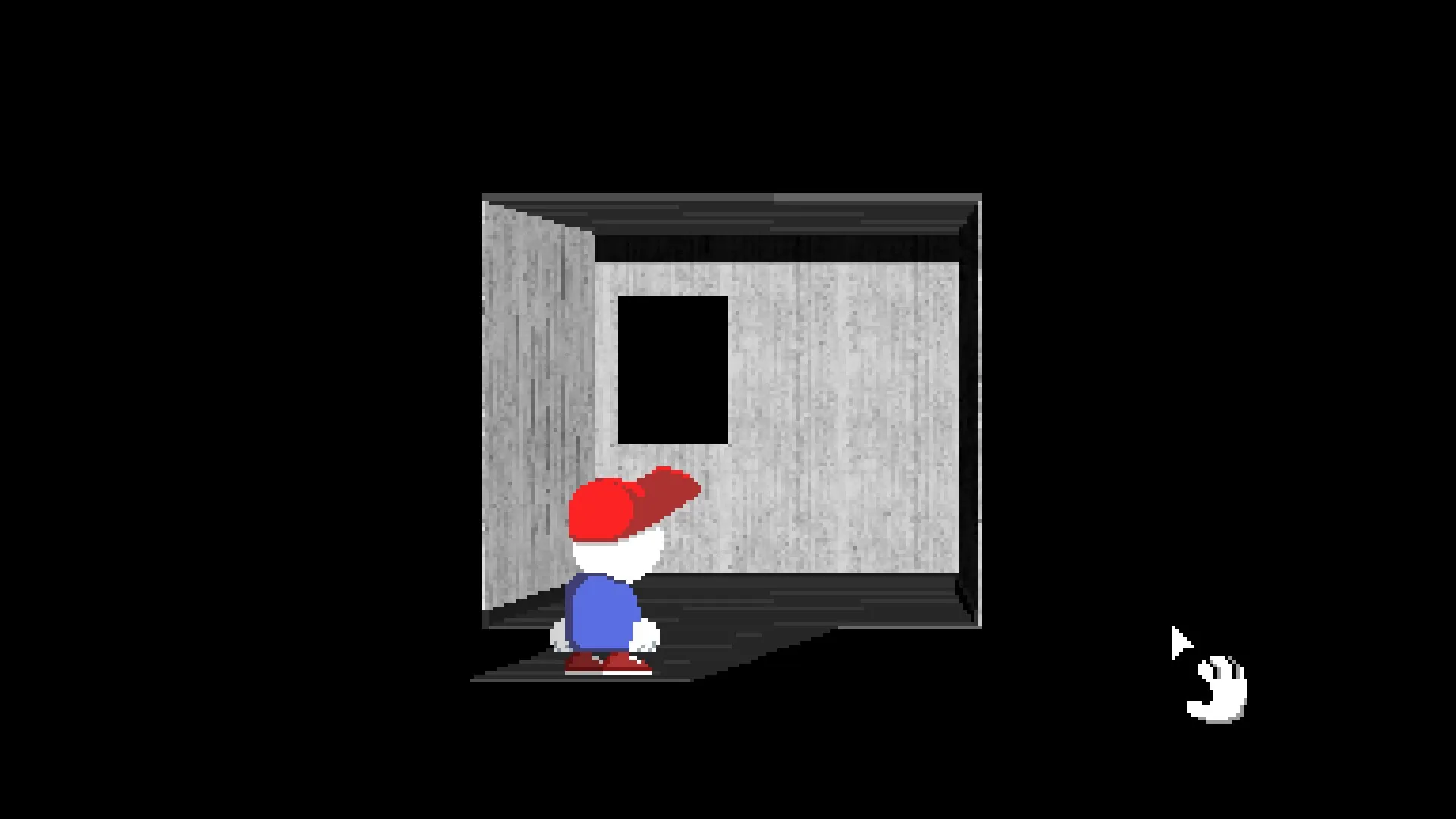
After solving the two lookalike-room puzzle, enter the smaller room and wait for the reversed voice. Leave the room, press Alt+Enter to put the game in windowed mode, then enter the smaller room again. The black opening should now be replaced by a large lock. Use the Lost Key on that lock. Community guides recommend doing this before defeating the Chameleon, but no independent source proves that the boss permanently locks the route.
FISHING PAPER · BROWSER CHECKLIST
Keep your Fishdex progress here
Mark each fish after the game records it. The Steam fish guide and an independent full walkthrough agree on all 18 names and their six clock periods.
Structure sources: Steam community guide ↗ · Independent full walkthrough ↗
Check first
- Players may call this the old key, ancient key or fishing key. Open the completed Fishing Paper once more and confirm that the in-game item named Lost Key is actually in your inventory.
- Finish the puzzle connecting the two lookalike Timesville rooms first.
- On PC, verify that Alt+Enter changes Endacopia from full screen to a window before attempting the room transition.
What to do
- Confirm the Lost KeyDig up the Fishing Paper, fill its 18 entries across all six clock periods, then reopen the completed paper. Check the inventory for Lost Key before leaving the fishing chain.
- Solve the paired-room puzzleComplete the shared puzzle in the two similar Timesville rooms, then identify the smaller of the two rooms.
- Enter the smaller room and waitRemain inside until the reversed voice finishes playing. Do not switch display mode before this cue.
- Leave and switch to windowed modeExit the smaller room, then press Alt+Enter on PC. Confirm that the game is visibly running in a window.
- Re-enter the same smaller roomThe former black opening should now look like a large lock rather than an empty black space.
- Use the Lost Key on the large lockThe lock disappears and the game moves into the skull memory-pair sequence. That next screen confirms the key was used correctly.
The large lock disappears and the skull memory puzzle opens.
If the Metal Detector stays silent while the Fishing Paper is still buried, first confirm that the game is updated to v1.08; the official notes say that version fixed a case where one remaining item produced no beep. The detector does not dig up the Lost Key itself: it uncovers the Fishing Paper. After filling all 18 entries, use or reopen the completed paper to make the key appear. If the key is already in your inventory but has no target, confirm that the reversed voice played, that you left before switching modes, that the game is actually windowed, and that you re-entered the smaller lookalike room rather than the normal-sized one. If you switched with Alt+Enter and the lock still does not appear, one player reports this fallback: save, return to the main menu, close full screen, reload, and return to the smaller room. Treat it as a player fallback, not a required step for every save.
Find the same screen
Use the screenshots to check that you are in the right room. Community images link back to the original post.
 Exact scene
 Community evidence
See it in action
The links start at the useful moment.
 ▶ WATCH
VIDEO BY Zhain Gaming
Timesville secret visual walkthrough
Starts at the Timesville chapter of the Ending C secrets video.
Sources
Built from the sources below. We have not run this route ourselves unless the page says so.
A player investigation, two guides and a video show the same room and window-mode sequence. The official v1.08 notes cover the Metal Detector beep bug, while a newer Steam thread confirms the common mix-up between digging up the Fishing Paper and receiving the Lost Key from the completed paper. Another player success report gives a fallback reload sequence if the lock still fails to appear after Alt+Enter.